
The minutes you have
Short bursts are fine: Change time plans the session again for the new length. Or play freely, with no clock at all.
Piano practice for iPhone and iPad
A coach that plans what you practice next: technique, chords that make sense, and playing freely without notes to follow.

You need an iPhone or iPad and a keyboard that connects by USB or Bluetooth MIDI, from 25 keys up. Most current digital pianos do.
We send one confirmation email, then invitations in small waves. The beta is for adults (18+).
This list is run by KeyFu (Martin Neuschulz), Kurt-Eisner-Straße 58, 04275 Leipzig, Germany, hi@keyfu.app (privacy).
You can hear it. Your hands can't play it yet.
The same movement, over and over, until it's yours: a chord shape, the next change, a steady left hand.
KeyFu plans the repetitions, then gets out of the way.
Your coach KeyFu
I don’t use sheet music. We’ll start from where you are.
Whenever I change something, I’ll tell you why.
KeyFu is a piano practice app for iPhone and iPad, for people who play without sheet music. It connects to your digital piano or MIDI keyboard and plans around you.
Short bursts are fine: Change time plans the session again for the new length. Or play freely, with no clock at all.
Pick a ready-made goal like Just sit down and play, add your own words like “play while I sing”, or both. Setting goals stays free forever.
From 25 to 88 keys: the exercises KeyFu picks fit your keyboard, and it can follow your octave buttons.
If the next exercise looks like too much, Let’s ease off says why and leaves the choice to you.
The coach’s pick, or any home note in any kind of key.
In C major, C, G, Am and F are 1, 5, 6m and 4 (m for minor). The numbers make the same move in every key, and the names change with it.

Blocks move toward a line, with the keys outlined below, and the roll waits until your chord is down. It’s there while a shape is new; one tap hides it.
When the roll has stopped earning its keep, the coach may offer to leave it off. You’re always asked first.
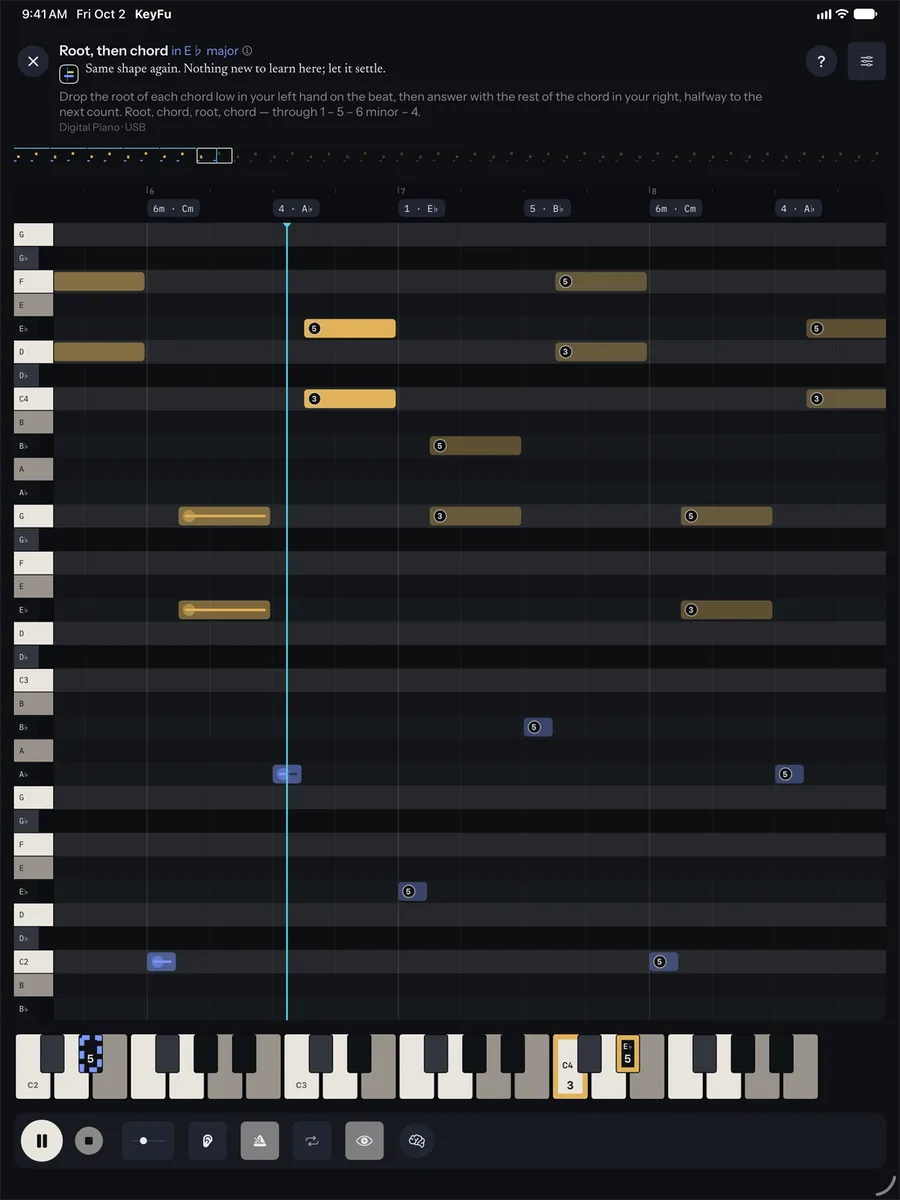
No plan, no clock. The app holds the harmony under you, and each run has one goal, picked from how your earlier runs went.

KeyFu, your coach, says why when he changes the plan. After an exercise, Ask KeyFu opens a chat about how it went.
After an exercise

How it went, where next time starts, which skills grew.
Your skills
Your coach KeyFu
Timing is leading. Ear is your next win — worth a session. Your goal leans on Chord moves, Chord shapes, and Low notes — and that's where most of this week went.

Each slice is one skill and fills as it grows. Freshness shows how well each is holding, with the days since you played it; a week away resets nothing.
The six places on your dashboard. The library and its ready-made routines are free for everyone.
Pricing
KeyFu is free during the beta. Fair pricing at launch — core practice stays free.
Free for everyone: the exercise library and its ready-made routines, any exercise you pick, and one session a week planned for you. Setting your own goals stays free forever.
KeyFu Pro plans the right session every time you sit down and lets you build your own routines. Everyone on the beta list gets a discounted first year.
How the discounted first year worksEach conversation with your coach costs real money to run, so invitations go out in small waves.
No lessons or sheet music needed. Songwriters, people coming from another instrument and anyone who already plays a bit and wants to play freely are especially welcome.
We send one confirmation email, then invitations in small waves. The beta is for adults (18+).
This list is run by KeyFu (Martin Neuschulz), Kurt-Eisner-Straße 58, 04275 Leipzig, Germany, hi@keyfu.app (privacy).
You need an iPhone or iPad and a keyboard that connects by USB or Bluetooth MIDI — most current digital pianos do.
Runs on iOS 18 or iPadOS 18 and later.