Today’s practice
Today’s practice, start to finish
KeyFu is a piano practice app for iPhone and iPad. Here is one day’s practice, from the cable to the coach’s recap, and every screen below is the real app.
Sit down. Plug in.
iPad on the music stand or iPhone by the keys, one USB cable. Tell KeyFu how many keys you have, from 25 to 88, and the exercises it picks stay inside them.

USB works the moment you plug in. For Bluetooth MIDI, tap Connect a Bluetooth keyboard in KeyFu, then pick your keyboard.
Say what you want
Set it once, change it any time: a bassline you can’t play yet, chords while you sing, both hands without a video.

Pick a ready-made goal, add your own words, or both. Rings on your skill wheel mark the skills it leans on, and changing it resets nothing.
KeyFu plans today
Today’s session is built from your goal and what your hands played before, sized to your time. The coach says why, and names anything new.

Start it, change how long it runs, or skip an exercise for today. It plays in today’s key: the coach’s pick, or one you choose on the home screen.
Play
Blocks move toward a line, with the keys outlined below, and the roll waits until your chord is down. It’s there while a shape is new; one tap hides it.
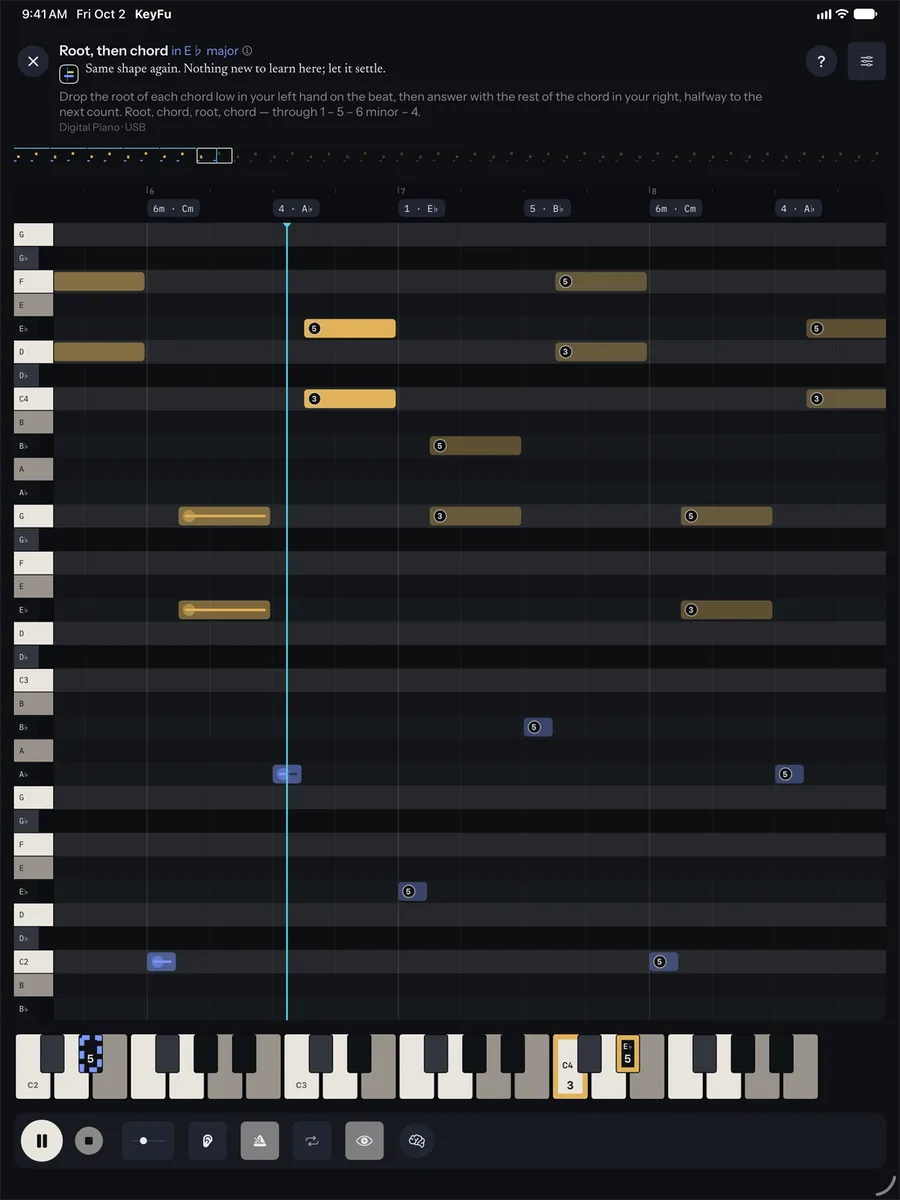
When the roll has stopped earning its keep, the coach may offer to leave it off; you’re always asked first. A shape that’s new to you can start untimed, in Shapes first.
Where next time starts
Next time does not begin at 01 again. Come back after a longer break and it eases in rather than starting over.

Each exercise ends on a Done card: what moved, what dipped, what’s next. His recap in the coach thread can name what to work on next, and your dashboard shows it.
Join the beta
Invitations go out in small waves. KeyFu is free during the beta.
We send one confirmation email, then invitations in small waves. The beta is for adults (18+).
This list is run by KeyFu (Martin Neuschulz), Kurt-Eisner-Straße 58, 04275 Leipzig, Germany, hi@keyfu.app (privacy).
You need an iPhone or iPad and a keyboard that connects by USB or Bluetooth MIDI — most current digital pianos do.